
Sales Demo Best Practices: A Proven Framework to Close More Deals
High-performing sales demos start with business context, not features. The most effective reps research the prospect’s industry, tailor the conversation to each stakeholder’s role, and anchor the demo around a clear, agreed-upon outcome before showing the product. They connect features directly to measurable ROI, use interactive walkthroughs instead of slide-heavy monologues, proactively address objections, and maintain tight transitions that keep the story focused. Strong demos also include immediate personalized follow-up and ongoing review of recordings so teams can refine messaging, improve qualification, strengthen pricing confidence, and consistently move deals forward.
Sales demos are awkward when they are run like a theater. Click here. Watch this. Trust me. Buyers sit there waiting for the part that actually matters, and sellers keep talking past it. This “let me show you everything” syndrome is a deal killer. But by following a few simple sales demo best practices, you can leave the buyer grinning and imagining life with your product.
And that is exactly what this guide is for. We will give you 9 best practices to run your demo that make your product the obvious next step without saying it. Plus, we will also point out 5 mistakes that quietly destroy demos – even for experienced sellers.
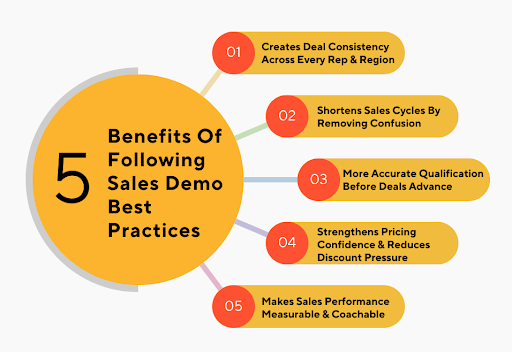
Why Following Sales Demo Best Practices Matters More Than You Think: 5 Key Benefits
Most teams think demos only affect close rates. But they actually influence almost every part of your sales process, and that is what we are getting into next.
1. Creates Deal Consistency Across Every Rep & Region
Without a demo framework, reps improvise. One rep frames the problem clearly. Another jumps straight into features. One region sells outcomes. Another sells automation tools. None of this is wrong, but it creates 3 different buying processes for the same product.
Sales demo best practices remove improvisation from the sales funnel. They standardize:
- What every demo must open with
- What proof must appear before pricing is shown
- What outcome must be agreed upon before the next step is scheduled
This means leadership can finally trust that a “Stage 3 deal” means the same thing everywhere. It also means onboarding new reps becomes faster because you teach one demo motion, not 10 personal styles.
2. Shortens Sales Cycles By Removing Buyer Confusion Early
Most delays happen after the demo, not during it. Buyers leave thinking “I still need to ask IT” or “I need to see how this compares.”
Sales demo best practices force those questions into the demo itself. Not later. Not in follow-ups.
You deliberately:
- Show where your product fits inside their technical environment, not just inside your UI.
- Walk through what happens in week one, not month six.
- Compare alternatives on the exact decision criteria the buyer uses internally.
When buyers leave the call, they don’t need another meeting to understand the basics. They only need internal approval. That cuts days or weeks off the cycle.
3. More Accurate Qualification Before Deals Advance
Loose demos allow bad deals to survive. Buyers can stay vague. Reps can stay optimistic. Nobody checks assumptions. That creates deals that look promising but collapse late.
Sales demo best practices turn the demo into a filter. During the demo, you intentionally:
- Expose implementation complexity instead of hiding it.
- Surface internal dependencies rather than skipping them.
- Validate urgency with real deadlines instead of soft interest.
If the deal still advances, it does so because it survived pressure – not because it sounded exciting. This cleans your pipeline at the top.
4. Strengthens Pricing Confidence & Reduces Discount Pressure
Discounting usually starts long before pricing is shown. It starts when buyers don’t see a direct line between your product and their internal success metrics.
Sales demo best practices create pricing strength by:
- Showing exactly how each feature connects to something the buyer already cares about.
- Putting real numbers around time saved or money gained during the demo.
- Framing the price as a trade against their current costs – not against competitors.
When buyers already understand the business tradeoff, pricing becomes a confirmation step.
5. Makes Sales Performance Measurable & Coachable
When demos vary by rep, feedback becomes vague. Managers end up saying things like “Be more confident” or “Tell a better story,” which do not change outcomes.
Sales demo best practices turn demos into something you can measure and coach:
- You can evaluate which demo sections correlate with progression.
- You can spot where reps lose control or lose attention.
- You can coach exact moments, not vague habits.
This moves coaching from “be better on sales calls” to “change this part of your demo.” And that is where sales performance actually improves.
9 Sales Demo Best Practices Proven To Deliver Better Close Rates
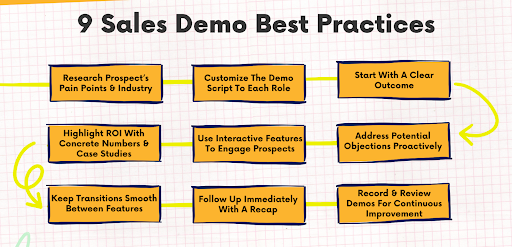
Most demos die before they even get started. Follow these 9 sales demo best practices, and every call has a clear path to closing.
1. Research Your Prospect’s Pain Points & Industry Thoroughly
If you enter a demo without knowing how this company actually makes money or where it loses time, you are working off assumptions. And this shows up immediately in the way you frame the product and the prospect’s challenges you highlight. Strong demos start with business context – not product context.
Do This:
- Write a one-paragraph business summary in your own words – who they sell to, how they sell, how they scale.
- List 3 operational risks their industry faces right now. These should be based on market trends or tech shifts.
- Identify one workflow they rely on daily and one issue that likely slows it down.
- Prepare two example scenarios using their real business environment – not a generic use case.
2. Customize The Sales Demo Script To Each Decision-Maker’s Role
When multiple stakeholders join a demo, they are looking for different signals. A finance leader listens for risk and cost. An operations lead listens for efficiency and reliability. A technical lead listens for feasibility and integration. A single script cannot serve all of them. Customizing demos keeps everyone engaged without turning the call into a ramble.
Do This:
- Create a one-page role map for each attendee. Specify their job title and what they are responsible for inside the company.
- Assign one primary business concern to each role and align one product capability directly to it.
- Write one customized outcome statement for each role so each person sees a result that applies to them.
- Prepare one role-specific objection per stakeholder and plan your response in advance.
3. Start With A Clear Outcome, Not A Product Tour
The moment a demo opens on the product’s features, momentum drops. Your target audience wants to know where this is headed before they care about buttons and screens. Start with the outcome, and everything makes sense. Start with screens, and buyers are left figuring out what they should even be paying attention to.
Do This:
- State one business outcome that the buyer said they want to achieve in this evaluation.
- Confirm the outcome verbally before opening your product.
- Outline the exact steps you will walk through to reach that outcome during the demo.
- Use the outcome as your anchor and redirect the conversation back to it if the demo drifts.
4. Highlight ROI With Concrete Numbers & Case Studies
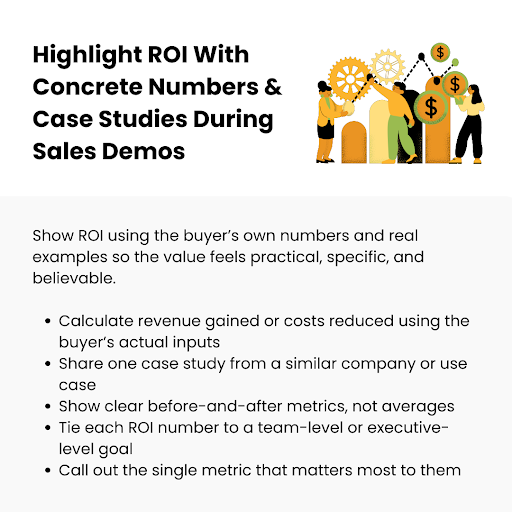
Buyers don’t say yes just because your product looks slick. Deals move when the numbers actually add up for the buyer. For a better sales demo, match the ROI to their day-to-day reality – not some vague percentage or generic claim. One real-world example. One metric that matters to them. One result they can see.
Do This:
- Calculate estimated revenue gained or costs reduced using the buyer’s own inputs.
- Present at least one case study from a company similar in size or use case.
- Show before-and-after operational metrics to make the change tangible.
- Connect every ROI figure back to a department-level or executive-level business objective.
5. Use Interactive Features To Engage Prospects, Not Just Show
A demo shouldn’t be a screen-share monologue. If you do all the clicking and talking, the buyer stays in observer mode – and they disengage. Interactive demos pull the buyer into the conversation and make them part of the story. When you let them try something or explore alongside you, you see concerns and prevent the demo from being just a passive lecture.
Do This:
- Ask the buyer which workflow they want to start with rather than choosing for them.
- Let them decide the order of screens instead of following your default path.
- Pause after major steps and ask them to confirm whether that step matches their process.
- Use real inputs from the prospect’s business instead of preloaded example data.
6. Address Potential Objections Proactively During The Demo
Waiting for objections after the demo is too late. By then, doubts have already formed and may be reinforced internally without you present. Successful sales demos surface and resolve objections inside the demo environment, while context and attention are still high.
Do This:
- Identify the top 2–3 objections for this type of buyer ahead of time and weave answers into the sales demo process.
- Introduce potential concerns with phrases like, “One thing we see most customers ask about…” and answer them immediately.
- Use a short live example or mini-demo to resolve each objection rather than talking theoretically.
- Reassure without overexplaining. Show how the product handles the issue in their real-world context.
7. Keep Transitions Smooth Between Features To Maintain Flow
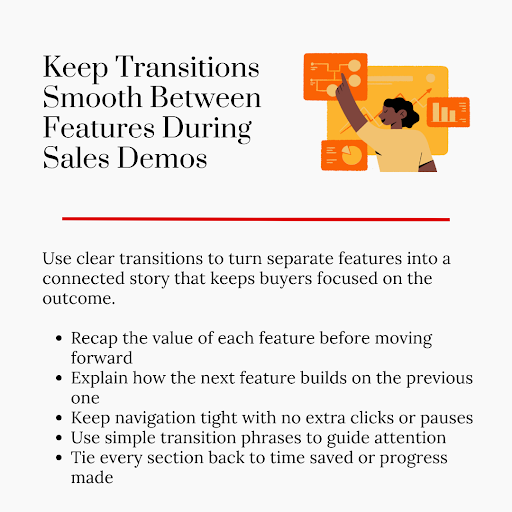
Most software demos lose momentum between screens – not within them. Long pauses, awkward navigation, unclear transitions – they all break the rhythm and distract potential customers from the outcome. Smooth transitions keep the demo moving like a connected story rather than a set of disconnected features.
Do This:
- Summarize key features briefly before moving on. Connect it back to the specific challenge or outcome.
- Use transitional phrases to show how one feature naturally leads to the next and builds on the previous step.
- Avoid long pauses, tangents, or unnecessary clicks that distract from the flow.
- Constantly link every section to how it improves the buyer’s journey or saves time.
8. Follow Up Immediately With A Personalized Recap
A well-crafted demo loses impact if there is no follow-up. Buyers forget details quickly. Generic recap emails get deleted. A well-crafted and personalized pre-recorded demo reinforces the key points you made and makes taking the next step simple. Timing matters just as much as content. The sooner the follow-up, the stronger the momentum.
Do This:
- Send the recap within hours, not the next day.
- Include the main outcome in your follow-up email and how the product achieves it in their context.
- Highlight role-specific benefits for each attendee. Make it relevant to their responsibility.
- End with a clear and actionable next step – scheduling a trial, internal review, follow-up call.
9. Record & Review Demos For Continuous Improvement
No demo is perfect, and you don’t get better by assuming what worked. Recording demos lets you see exactly what the buyer saw and catch things you missed in the moment. Reviewing your own demos – or having a teammate review them – turns every call into training. Over time, small tweaks compound, and your demos start closing more deals.
Do This:
- Record every demo – even the ones you think went “well,” so you see real patterns.
- Watch your recordings within 24 hours. Note moments where the buyer lost focus or asked repeated questions.
- Track phrases or transitions that work and those that stall the conversation.
- Share recordings with teammates or managers for feedback. Ask for feedback on clarity and alignment with outcomes.
5 Common Sales Demo Mistakes That Kill Deals + How To Fix Them
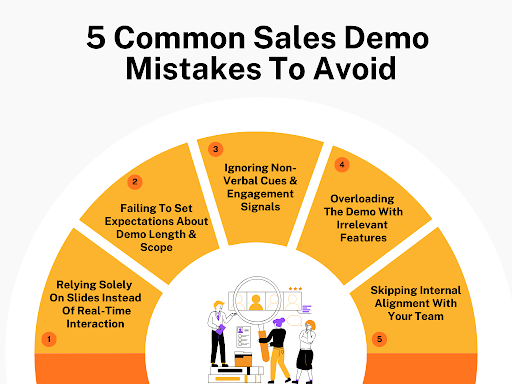
These 5 common mistakes are the silent deal killers – and fixing them is easier than most reps think.
1. Relying Solely On Slides Instead Of Real-Time Interaction
Some sales reps treat the slide deck as if it were carrying the demo. Click, click, click – and the buyer stares into the void. Slides don’t interact and don’t answer the questions that the buyer hasn’t even asked. By the end, they might have heard everything you said, but none of it actually connects with how they work every day.
How To Fix It:
Ditch the deck as the star and make the demo interactive. Walk the buyer through a scenario that mirrors their actual work and let them interact with it. Use stories for a better explanation of the friction moment and resolution, so buyers can follow the logic without assuming. If a slide is necessary, use it as a reference point – not the main focus.
Real-World Example:
Uproas used to walk prospects through polished slides explaining how Facebook Business Managers are sourced and transferred. The problem showed up fast. Agencies froze when it came time to buy, because they never saw how the handoff actually worked in practice. Buyers worried about access loss and account flags that the slides never answered.
Uproas changed the demo by opening a live dashboard and walking through a real request from start to finish. They showed how a manager is assigned, how permissions are verified, and what happens if an account gets restricted. The turning point was letting buyers watch the process instead of hearing about it. Close rates improved because the risk felt visible and controlled.
2. Failing To Set Expectations About Demo Length & Scope
Jumping into a sales demonstration without telling the buyer how long it will run or what is on the agenda confuses everyone. Some expect a quick 20-minute overview and get a 45-minute deep dive. Others want to see results but end up with irrelevant workflows.
Running sales demos for too long without any direction frustrates the prospective customers, and they leave without really understanding why your product matters.
How To Fix It:
Tell the buyer exactly what the live demo will cover and how long it will take. Lay out the agenda in simple terms and stick to it. That upfront clarity prevents off-topic tangents and ensures every feature links back to their real-world needs.
Real-World Example:
Higgsfield AI sells complex enterprise video and image generation workflows. During early demos, buyers mentally checked out halfway through – not because the content was wrong, but because attention was spent too early. Enterprise buyers burned their focus on setup explanations and had little energy left for output quality, which was the real buying trigger.
Higgsfield reorganized demos around attention economics. They moved the most visually impressive outputs to the first 10 minutes and pushed architectural depth to optional segments later. This reframing ensured buyers used their sharpest focus on what mattered most.
Even when demos ran long, decision-makers stayed engaged because their priorities were addressed before attention dropped.
3. Ignoring Non-Verbal Cues & Engagement Signals
Some reps just keep talking and take silence as a good sign. It isn’t. Crossed arms, sideways glances, long pauses – all of these show that the buyer is skeptical or bored. If you keep pushing ahead at your own pace, you are talking to someone who is already halfway gone. And the confusion sits there until it quietly kills the deal.
How To Fix It:
Pay close attention to the buyer and react immediately. If you see their focus slip, pause and ask a clarifying question. Show the same thing a different way and slow things down if needed. Adjust your pace and approach based on what you see – not just your script.
Real-World Example:
Unitel Voice sells cloud phone systems, and their demos used to run on autopilot. Reps talked through call routing and IVR trees without checking how buyers were reacting. In many calls, IT leads stopped taking notes or muted themselves for long stretches. Deals stalled later when objections surfaced out of nowhere.
Unitel trained reps to pause at specific moments and check engagement directly. If attention dropped, they shifted to a live call flow or asked the buyer to describe their current setup. This adjustment surfaced confusion immediately. Buyers stayed present, and follow-ups focused on decisions instead of damage control.
4. Overloading The Demo With Irrelevant Features
Showing everything you can think of sounds like a good idea, but it usually does the opposite. The buyer doesn’t need every feature. And adding too many details hides the important parts. By the end, they have seen a lot, but they leave unsure about what the product actually does for them.
How To Fix It:
Remove everything that doesn’t solve the buyer’s immediate problem. Focus on the 2–3 specific features linked directly to their workflow and outcomes. Reference optional or advanced capabilities later, after the core demo lands. That way, the entire demo stays tight and easy to follow.
Real-World Example:
SocialPlug offers multiple growth services, and demos used to cover everything in one go – YouTube subscribers, Instagram growth, TikTok engagement, delivery timelines, dashboards, support flows. Buyers left impressed but unclear. Many could not explain internally why one service mattered more than another.
SocialPlug changed the structure by narrowing each demo to a single outcome. For YouTube buyers, the demo focused only on delivery speed and retention behavior. Everything else was mentioned briefly at the end or saved for follow-up.
This shift made the value easy to explain internally. Buyers could articulate exactly what they were purchasing and why. That clarity reduced hesitation and cut decision time significantly.
5. Skipping Internal Alignment With Your Team
Jumping into a demo without syncing internally is asking for trouble. The sales team members might promise features that aren’t live yet. Product might have insights into real configurations that could make your example way clearer. Without alignment, you end up hedging answers or underselling what the product can actually do.
How To Fix It:
Take 10 minutes to touch base with your sales engineer or product team before the demo. Make sure you know which relevant features are actually live and which use cases will make the most sense to show. This keeps the product demo running smoothly and leaves the buyer confident in the product – and in you.
Real-World Example:
Criminal defense lawyers at Freeburg Law aren’t running classic product demos. But they do run demos in a different form – first consultations. They serve the same purpose as a sales demo in SaaS. And we are including them because many businesses don’t sell SaaS, yet still use demos to explain complex services or outcomes before a client commits.
At Freeburg Law, early consultations sometimes went sideways when intake staff and attorneys weren’t aligned. One person would reference outcomes that depended on specific conditions, while another described a different process entirely. Prospects picked up on the inconsistency and lost trust.
The firm fixed this by aligning internally before consultations. Attorneys clarified which scenarios applied to which charges, and intake staff adjusted how they framed expectations. Demos became consistent and based on real case paths.
Clients left with a clear understanding of what applied to them specifically, which increased signed engagements and reduced follow-up clarification calls.
Conclusion
The big advantage of using these sales demo best practices is control. Buyers walk away knowing exactly what your product does for them, and more importantly, why it matters. So stop trying to impress. Start making the decision easier. Keep only what helps someone get to yes. Remove anything that slows them down or clouds the message.
We built CrankWheel to solve the exact thing every great sales demo needs – a friction-free way to show what you are talking about right when it matters. You send a link over SMS or email, and your prospect is looking at your screen in seconds – no downloads, no waiting.
We have made it so simple that even a distracted or less tech-savvy buyer can join quickly on any device or browser. You can walk them through exactly what you promised they would see, and that alone changes how demos convert. CrankWheel also lets you share forms in real time, or even hand control over to them when you want them to explore something.
Try CrankWheel free today and see how quickly your demos can go from “okay” to unmistakably clear.
About the author:
Burkhard Berger is the founder of Novum™. He helps innovative B2B companies implement modern SEO strategies to scale their organic traffic to 1,000,000+ visitors per month. Curious about what your true traffic potential is?
FAQs: Sales Demo Best Practices
1. What are the most important sales demo best practices?
The most effective sales demo best practices include:
- Starting with a clear business outcome instead of a product tour
- Customizing the demo to each stakeholder’s role
- Connecting features directly to ROI and measurable impact
- Addressing objections during the demo, not after
- Following up immediately with a personalized recap
These practices make the product feel like a natural solution rather than a forced pitch.
2. Why do most sales demos fail?
Most sales demos fail because they focus too heavily on features, overload buyers with irrelevant information, ignore engagement signals, and lack structure. When reps improvise or try to “show everything,” buyers leave confused, which leads to stalled deals and extended sales cycles.
3. How can sales demos shorten the sales cycle?
Structured demos shorten sales cycles by removing confusion early. They proactively address technical fit, implementation steps, ROI impact, and decision criteria during the call. When buyers leave with clarity, they only need internal approval—not another meeting to understand the basics.
4. How can sales teams measure and improve demo performance?
Sales teams can improve demo performance by recording and reviewing calls, identifying which demo sections correlate with deal progression, coaching specific moments rather than vague behaviors, and standardizing a repeatable demo framework across reps. This makes demo performance measurable, coachable, and scalable across regions.